


Download HP Simplepass – secure fingerprint login tool for Windows
Overview
HP Simplepass is a free security utility designed for HP‑branded laptops and desktops running the Windows operating system. Unlike traditional password‑based authentication, Simplepass lets you unlock your computer with a single touch of your fingerprint, turning the built‑in biometric sensor into a fast, reliable gatekeeper. The software is marketed toward security enthusiasts who want to reduce the attack surface created by weak or reused passwords.
By storing encrypted fingerprint templates locally, Simplepass eliminates the need for cloud‑based verification, which many users consider a privacy advantage. Installation is advertised as a “quick and easy” process that can be completed in under five minutes, even for people who are not technically inclined. Once set up, the application runs silently in the background, intercepting the Windows logon sequence and prompting the user to place their finger on the sensor.
If the fingerprint matches the stored template, the system logs in automatically; otherwise, it falls back to the standard password prompt. HP claims that the solution offers near‑instant login times, a lower risk of credential theft, and compliance with common enterprise security policies. However, the tool is limited to HP hardware that includes a compatible fingerprint reader, and it only supports Windows 10 and later versions.
This restriction makes it unsuitable for users with non‑HP devices, macOS, Linux, Android, or iOS platforms. Despite the narrow compatibility, HP Simplepass can be a valuable addition for HP owners seeking a frictionless, password‑free experience while keeping their data safe from common hacking techniques.
Key Features
- Fingerprint‑only login: Replaces the traditional password entry with a single touch on the built‑in sensor.
- Local template storage: Fingerprint data is encrypted and stored on the device, ensuring no biometric information leaves your PC.
- Fast authentication: Login times are typically under one second, providing a seamless experience.
- Automatic fallback: If the fingerprint is not recognized, Windows prompts for the original password, preventing lock‑outs.
- Zero‑cost licensing: The software is completely free for HP users, with no hidden subscription fees.
- Regular updates: HP releases security patches and driver updates to keep the biometric engine current.
- Enterprise‑ready logging: Generates audit logs that can be integrated with existing security information and event management (SIEM) tools.
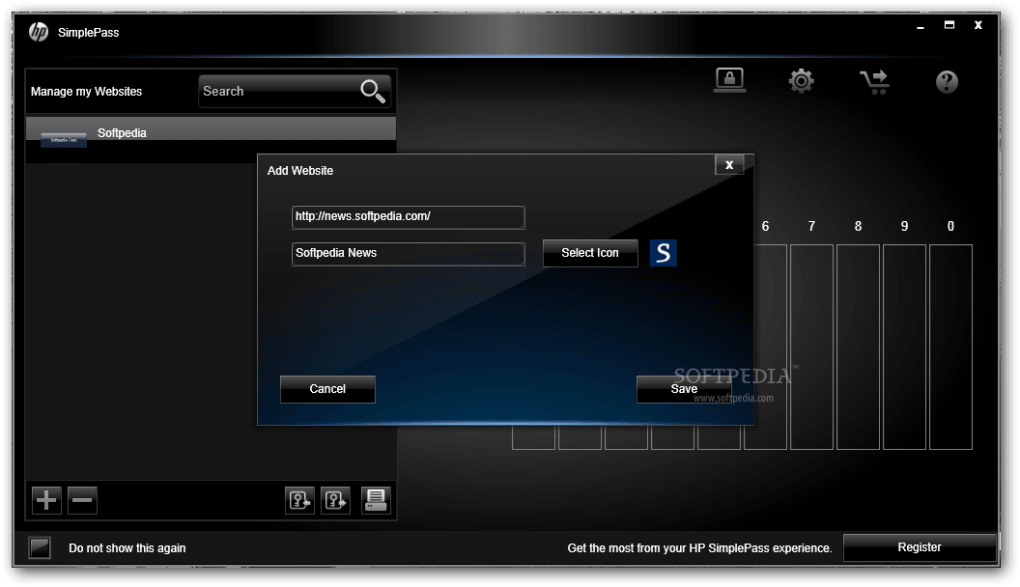
- Simple UI: A clean control panel lets users enroll, delete, or rename fingerprint profiles with just a few clicks.
Installation, Usage & Compatibility
Getting HP Simplepass up and running is straightforward, especially for users already familiar with HP support utilities. First, visit the official HP support page and download the latest Simplepass installer (an .exe file). The installer is digitally signed by HP, which helps Windows Defender verify its authenticity and keep the download secure.
Run the installer with administrator privileges; the wizard will guide you through a standard “Next‑Next‑Finish” flow. During installation, the program checks for a compatible fingerprint sensor and automatically installs the necessary driver if it is missing. Once the software is installed, a brief reboot is required to integrate the biometric service with the Windows logon subsystem.
After reboot, launch the Simplepass control panel from the Start menu. The first step is to enroll your fingerprint: place your finger on the sensor, follow the on‑screen prompts to capture multiple angles, and assign a friendly name (e.g., “Work Finger”). You can add up to five fingerprints per user account, which is useful for shared workstations. The application also provides options to adjust sensitivity, enable or disable automatic login, and configure fallback behavior.
Compatibility is limited to HP devices that ship with a supported fingerprint reader and run Windows 10 (64‑bit) or later. The software will not install on older Windows versions, non‑HP hardware, or any macOS, Linux, Android, or iOS platforms. System requirements include at least 2 GB of RAM, 200 MB of free disk space, and a TPM 2.0 chip for secure key storage (optional but recommended). Because the solution relies on Windows Hello APIs, it inherits the same security guarantees, such as anti‑spoofing measures and secure enclave processing. Users should ensure that their BIOS is up to date and that Secure Boot is enabled to maximize protection.
Pros, Cons, FAQ & Conclusion
Pros
- Fast, password‑free login improves productivity.
- Biometric data stays on the device, enhancing privacy.
- Free for all eligible HP users—no subscription required.
- Simple enrollment process with an intuitive UI.
- Automatic fallback to password prevents accidental lock‑outs.
Cons
- Works only on HP hardware with a supported fingerprint sensor.
- Limited to Windows 10/11—no macOS, Linux, or mobile support.
- If the sensor fails, you must rely on the password fallback.
- Occasional driver conflicts reported after major Windows updates.
- Only up to five fingerprints per user account.
Frequently Asked Questions
Can I use HP Simplepass on a non‑HP laptop?
No. Simplepass checks for HP‑specific firmware signatures before installation, and it will refuse to run on other manufacturers.
Is my fingerprint data sent to the cloud?
All biometric templates are encrypted and stored locally within the TPM or Windows secure storage; no data is transmitted to external servers.
What happens if the fingerprint sensor is dirty or damaged?
The software will fall back to the traditional password prompt. Cleaning the sensor with a soft cloth usually restores performance.
Can I enroll multiple users on the same machine?
Yes. Each Windows user account can enroll its own set of fingerprints, and Simplepass keeps them isolated per profile.
Is HP Simplepass compatible with Windows Hello?
Simplepass uses the same underlying Windows Hello APIs, so it works seamlessly alongside other Windows Hello features like facial recognition.
Final Verdict
HP Simplepass delivers on its promise of a quick, password‑free login experience for HP owners. The tool is genuinely free, easy to install, and respects user privacy by keeping biometric data on the device. Its biggest drawback is the narrow hardware and OS support, which confines the benefit to a specific segment of users. If you own an HP laptop with a built‑in fingerprint reader and run Windows 10 or 11, Simplepass is a worthwhile addition that can shave seconds off every login and reduce reliance on passwords that are often reused across services. For anyone outside that ecosystem, the limited compatibility makes it less compelling compared to broader solutions like Windows Hello or third‑party biometric apps.
Ready to experience password‑free convenience? Download HP Simplepass now and secure your Windows workstation with just a touch.







